

我將 Chrome DevTool MCP Server 與 Chrome Lighthouse 搭配使用,以計算 Angular 應用程式的 SEO、無障礙功能(Accessibility)與 Agentic Browsing 分數。
當 MCP 伺服器回報了我無法理解的問題時,我詢問了 Antigravity CLI 中的 Gemini,以找出修復這些問題的正確解決方案。
首先,我們需要在 Chrome 中建立一個除錯設定檔,然後指示 Chrome DevTool MCP Server 對 http://localhost:5005/ 執行 lighthouse 稽核。
我的應用程式有一個 Node.js 腳本,可用於建立臨時的 Chrome 除錯設定檔,以執行 Lighthouse 與效能稽核。package.json 中也已新增 NPM 腳本來啟動 Chrome,並在完成後清理該設定檔。
"scripts": {
    "chrome:debug": "node scripts/chrome-debug.mjs start",
    "chrome:debug:stop": "node scripts/chrome-debug.mjs stop"
}
開啟一個新的終端機,並執行 Node.js 腳本以設定 Chrome 除錯設定檔。
npm run chrome:debug
開啟一個新分頁來建置應用程式並執行正式版本建置。
npm run build
npm run preview
開啟另一個分頁以啟動 Antigravity CLI。
agy
在 Antigravity CLI 的命令列中,要求 MCP 伺服器執行 Lighthouse 稽核並等待結果
devtool-mcp: please perform lighthouse audit on http://localhost:5005
MCP 伺服器在摘要中輸出了 SEO、無障礙功能(Accessibility)、Agentic Browsing 以及最佳做法(Best Practices)。與 Chrome 中的 Lighthouse 不同,lighthouse 稽核工具並未輸出效能(Performance)。我稍後需要使用 MCP 伺服器的效能稽核工具來取得 FCP、LCP、TBT 及 CLS。
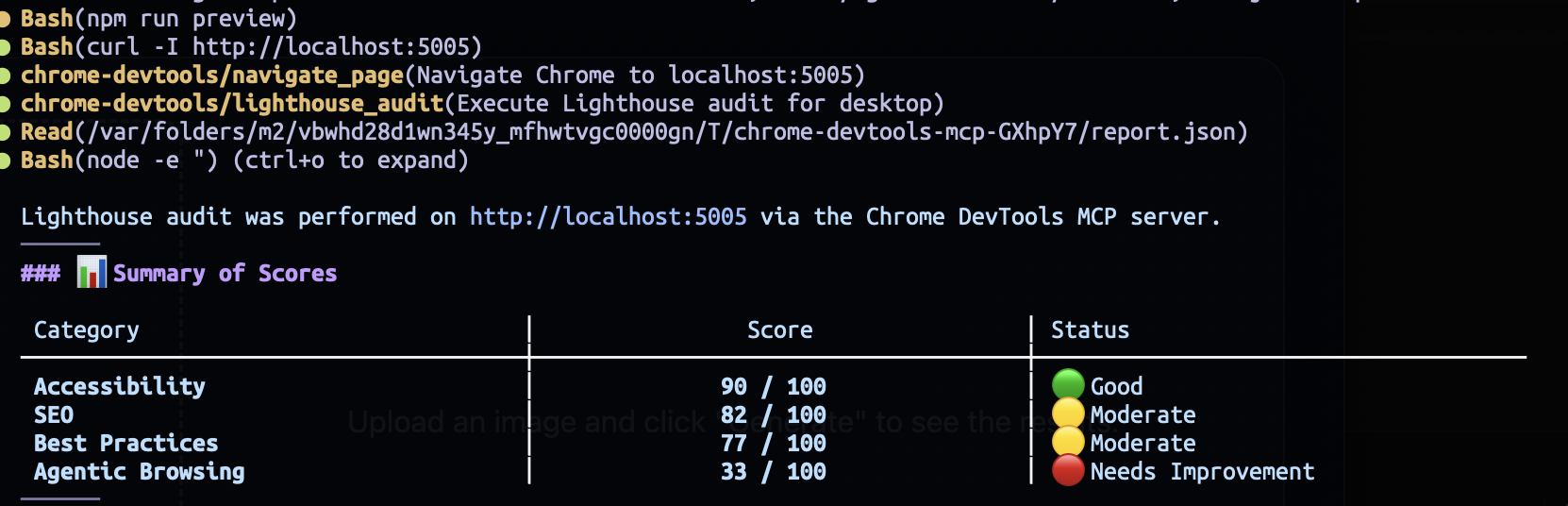
雖然無障礙功能得分很高且 SEO 呈現中等結果,但 Agentic Browsing 得分最低,僅為 33/100,需要立即處理。
Gemini 針對每個類別提供了詳細的反饋,為我們提供了進行改進的洞察。我們應該從最低分開始改善到最高分。

應用程式缺少 llms.txt,因此我將反饋貼到 Antigravity CLI 中,並提示 Gemini 將檔案產生至 public 資料夾。
- LLMs.txt (llms-txt):
- Requests to /llms.txt returned the default SPA index.html fallback instead of a valid Markdown file with Title and link references.  Please create the files in the public folder
Gemini 在 public 資料夾中產生了 llms.txt,分數提升至 67/100。
接著,我詢問 Gemini 如何修復關於無障礙樹(accessibility tree)的反饋。
Accessibility Tree (agent-accessibility-tree):
Combobox inputs require accessible labels for AI agents and screen readers.  How to fix it to get 100 in Agentic Browsing?
語音選擇器組合方塊(combobox)缺少 aria-label 屬性,這同時損害了無障礙功能與 agentic browsing。
<div
    id="voiceOption"
    ngCombobox
    #comboboxRef="ngCombobox"
    [(expanded)]="popupExpanded"
    [preserveContent]="true"
    class="form-field-select voice-trigger"
  >
  ....
</div>
我們將該屬性新增至 <div> 元素中,並提示 Gemini 建置應用程式以取得新分數。
<div
    id="voiceOption"
    ngCombobox
    #comboboxRef="ngCombobox"
    [(expanded)]="popupExpanded"
    [preserveContent]="true"
    class="form-field-select voice-trigger"
    aria-label="AI Voice Model"
  >
  ....
</div>
aria-label was added to the voice selector, please obtain the new Agentic Browsing score.
Agent Browsing 達到了 100 分,無障礙功能也提升至 94 分。
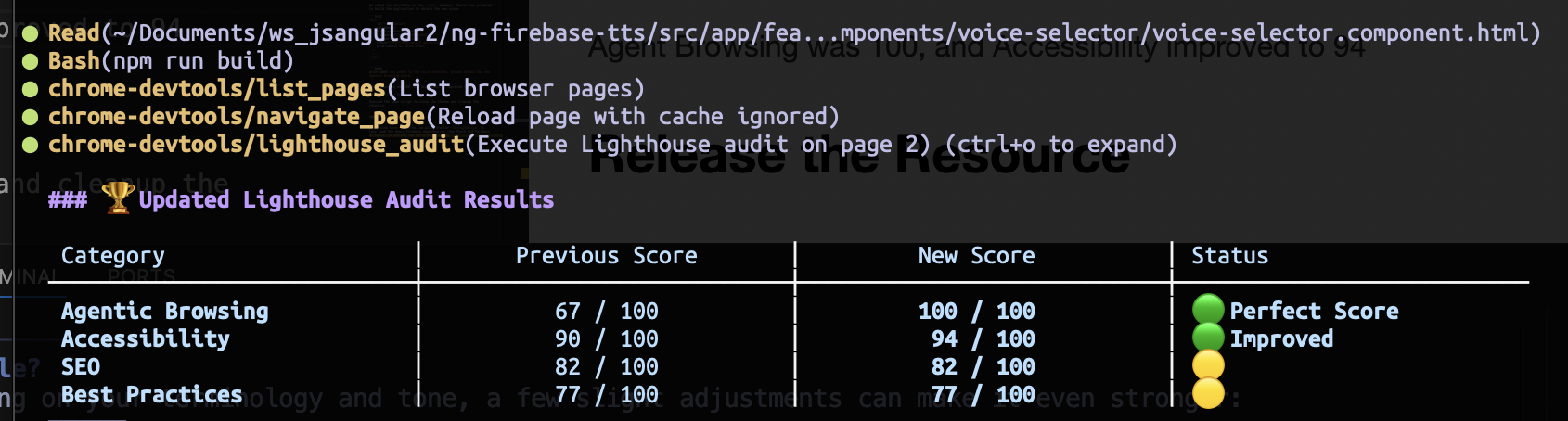
讓我們嘗試拿下無障礙功能剩餘的 6 分
無障礙功能的原始反饋包含三個意見:色彩對比度(color contrast)、標題階層(heading hierarchy),以及 ARIA Combobox 上的無障礙名稱(accessibility name)。
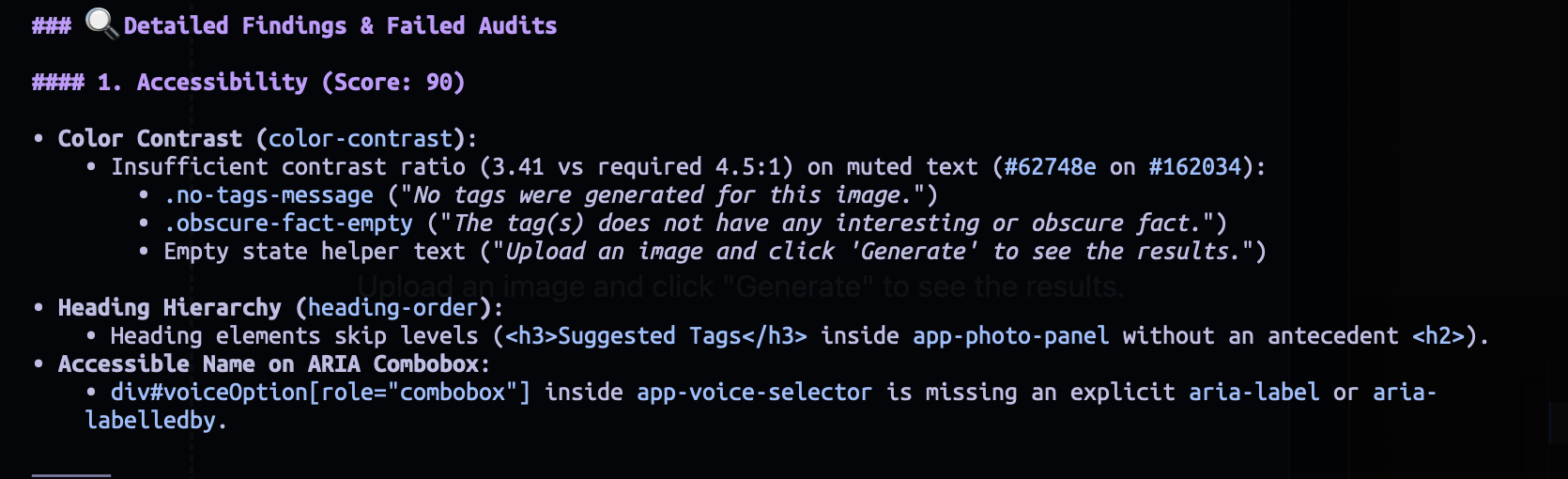
將反饋貼至 CLI 以從 Gemini 獲得修復洞察。
 Color Contrast (color-contrast):
 • Insufficient contrast ratio (3.41 vs required 4.5:1) on muted text (#62748e on #162034):
 • .no-tags-message ("No tags were generated for this image.")
• .obscure-fact-empty ("The tag(s) does not have any interesting or obscure fact.")
• Empty state helper text ("Upload an image and click 'Generate' to see the results.")

• Heading Hierarchy (heading-order):
• Heading elements skip levels (<h3>Suggested Tags</h3> inside app-photo-panel without an antecedent <h2>).

• Accessible Name on ARIA Combobox:
• div#voiceOption[role="combobox"] inside app-voice-selector is missing an explicit aria-label or aria-labelledby.

Please give insights to fix the issues
在 TagDisplayComponent 與 PhotoPanel 的範本中,需要將 <h3> 標籤改為 <h2> 以修復標題階層。
<div class="tags-wrapper">
  <h2 class="tags-title">Suggested Tags</h3>
  <div
    ngListbox
    class="tags-list"
    orientation="horizontal"
    selectionMode="explicit"
    multi="false"
    [aria-label]="tagAriaLabel()"
  >
    ... other HTML elements ...
  </div>
</div>
@let tags = parsed?.tags || [];
  @let hasTags = tags.length > 0;
  @defer (when hasTags) {
    <app-tags-display [tags]="tags" />
  } @placeholder {
    <div class="tags-wrapper">
      <h2 class="tags-title">Suggested Tags</h2>
      <p class="no-tags-message">No tags were generated for this image.</p>
    </div>
  }
文字顏色需要從 text-slate-500 改為 text-slate-400,以提高色彩對比度。
全域樣式表中定義了一個 text-muted 工具類別以供重複使用。接著進行全域取代,將 CSS 檔案中所有出現的 text-slate-500 取代為 text-muted。
@utility text-muted {
  @apply text-slate-400;
}
同樣地,提示 Gemini 取得新分數。
CSS files and heading were fixed. Please obtain the Accessibility score
Gemini 執行了 npm run build,對新的正式版本 Bundle 進行 Lighthouse 稽核。

無障礙功能分數從 90 -> 94 -> 98 -> 100 逐步提升。最後一個需要修復的類別是 SEO。
SEO 分數為 82 分,因為 index.html 缺少 meta description,且 public 資料夾中沒有 robots.txt。
我寫了一個提示,要求 Gemini 更新 index.html 並產生缺少的文字檔。
Please add the metadescription to index.html and generate the robots.txt in the public folder. Then, build the application to obtain the SEO score.
<meta
  name="description"
  content="Explore AI-powered vision analysis and zero-latency text-to-speech with Google Gemini and
  Firebase."
/>
我們在 index.html 中新增了 <meta name="description"> 標籤,明確定義應用程式的用途並提升 SEO 表現。
User-agent: *
Allow: /
同時新增極簡的 robots.txt 檔以符合 Lighthouse SEO 規範,確保搜尋引擎能順利爬取網站。
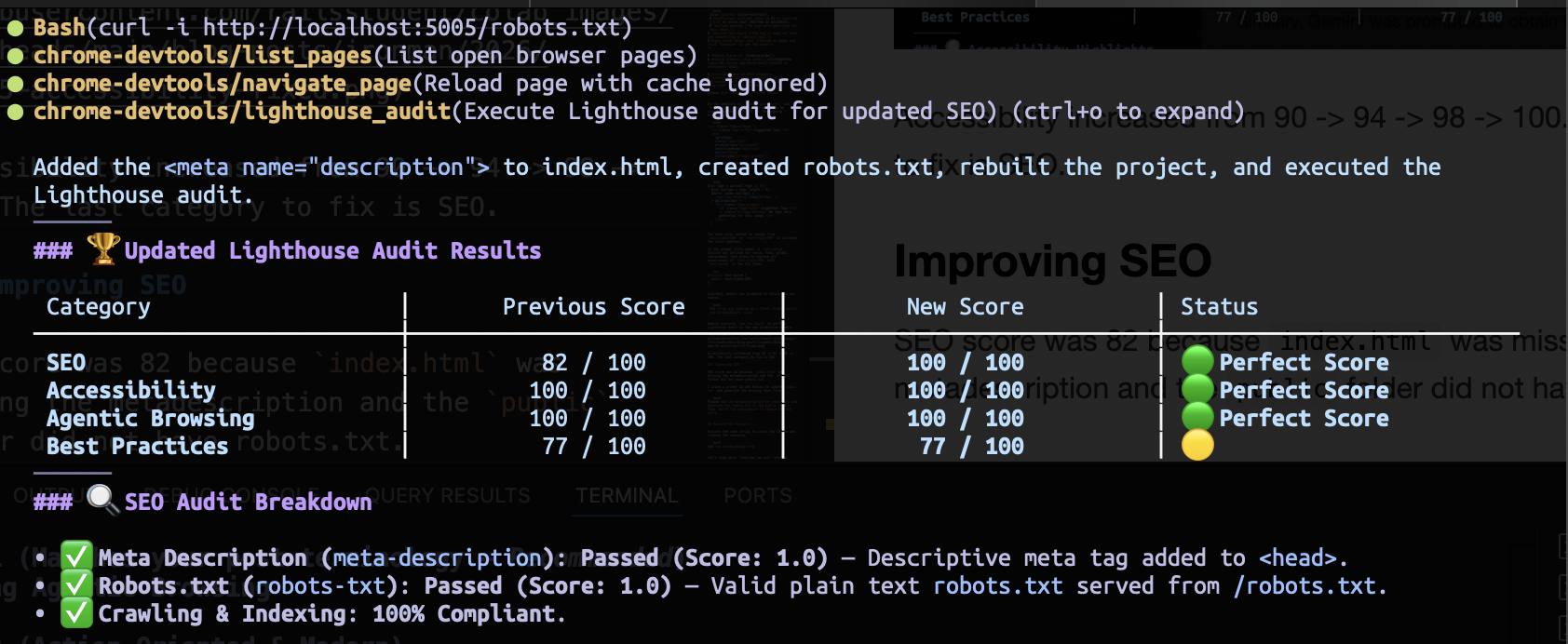
Gemini 記錄了所做的變更,SEO 分數也提升至 100 分。
執行相同的腳本來關閉 Chrome 並清理資源。
npm run chrome:debug:stop
今天就到此為止。明天,我們將重構 ConfigService 以延遲載入重量級的 Firebase 依賴項目(App Check 及 Firebase AI Logic),從而提升效能分數。


 iThome鐵人賽
 看影片追技術